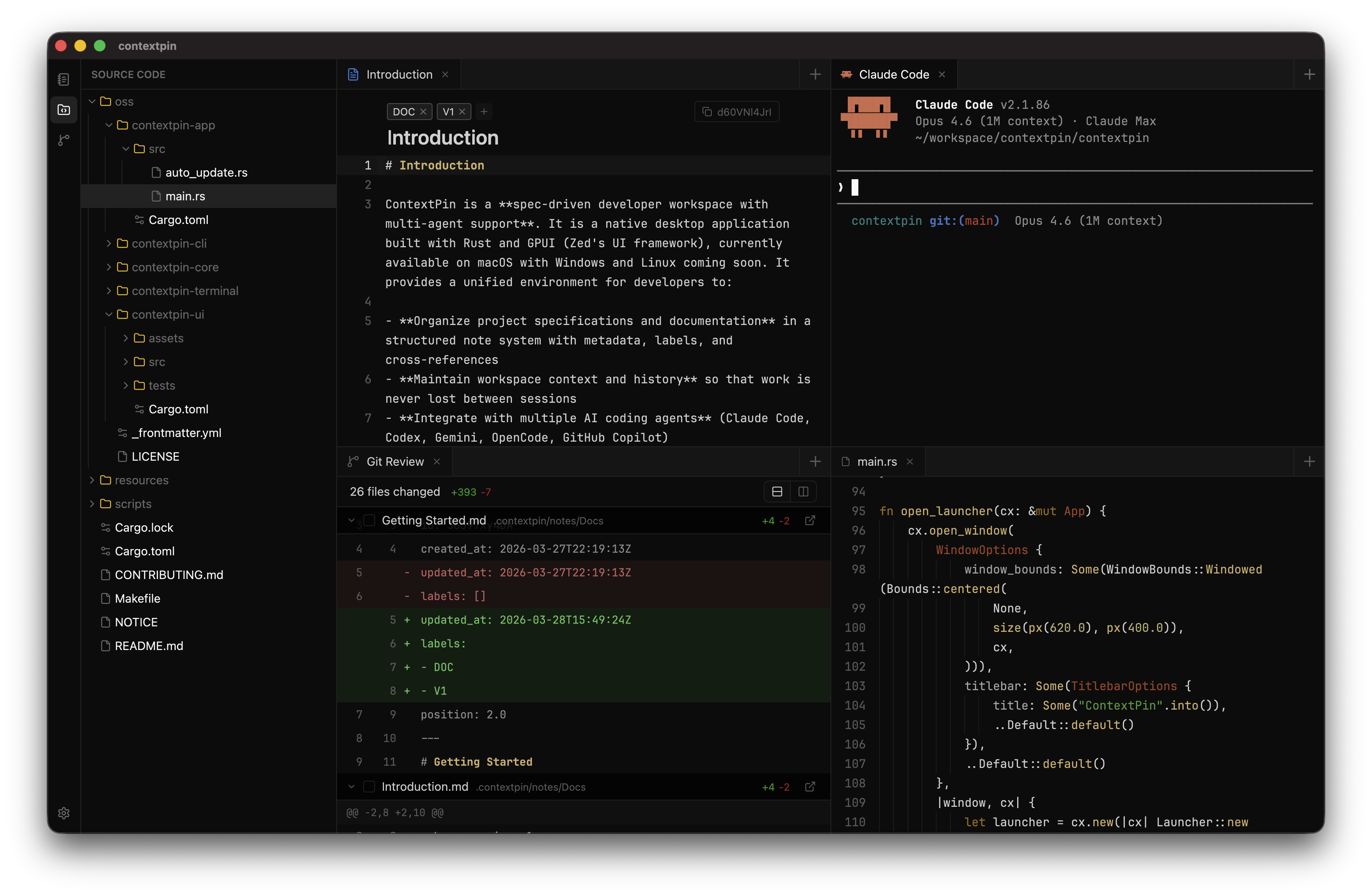
Local-First Context Editor for
Claude Code
Stop re-explaining your project's architecture, coding standards, and requirements. ContextPin makes your context available to any AI tool via MCP.
All Your Context, One Place
Organize once, access from any AI tool
Human-Friendly, AI-Ready
Write in a beautiful editor. ContextPin converts it to clean markdown that AI understands perfectly.
📋 Project Requirements
# Overview
Building a new authentication system for the mobile app.
# Key Features
# Technical Notes
# Timeline
Launch target: Q2 2024
# Project Requirements
## Overview
Building a new **authentication system** for the mobile app.
## Key Features
- [ ] OAuth 2.0 integration
- [ ] Biometric login support
- [x] Session management
- [ ] Password reset flow
## Technical Notes
```typescript
interface AuthConfig {
provider: 'google' | 'apple';
scopes: string[];
redirectUri: string;
}
```
## Timeline
Launch target: **Q2 2024** ← Drag to compare →
Drag. Drop. Reference.
Reference contexts and files inline—just drag into your text or type @
📋 Auth Refactor
Everything You Need
Powerful features designed to supercharge your AI workflows
MCP Protocol
AI assistants read and manage your documents directly. No copy-pasting needed.
Rich Editor
Markdown shortcuts, code blocks, tables, and drag-and-drop content blocks.
Full-Text Search
Find anything instantly. Search across all your contexts with highlighted results.
Version History
Every edit is saved. Restore any previous version with one click.
Cross-References
Link documents together. Embed files from your local repositories.
Local-First
Your data stays on your machine. No cloud, no sync, full privacy.
Simple Pricing
Start free, upgrade when you need more
Standard
billed yearly ($108/year)
- 1 device activation
- 1 year of updates
- All features included
- Email & Discord support
Enterprise
tailored to your needs
- Everything in Standard
- Team collaboration
- SSO & advanced security
- Dedicated support
Frequently Asked Questions
Everything you need to know about ContextPin
What is ContextPin?
ContextPin is a desktop application that helps you manage and organize context documents for AI coding assistants. It connects to tools like Claude, Cursor, and VS Code via the Model Context Protocol (MCP), allowing AI assistants to directly access your documentation, coding standards, and project guidelines.
How does the subscription work?
ContextPin uses a yearly subscription model. Once you purchase, you get full access to all features for one year, including updates. Your license is valid for a single device activation.
Is there a free trial?
Yes! ContextPin includes a 7-day free trial so you can explore all features before committing. No credit card required to start.
What happens when my subscription expires?
When your subscription expires, the app enters read-only mode. You can still access and view all your documents, but you won't be able to create or edit content until you renew.
Can I get a refund?
Yes. If you're not satisfied with ContextPin, you can request a full refund within 14 days of purchase. No questions asked. Just contact us at support@contextpin.com.
Where is my data stored?
All your data is stored locally on your machine. Nothing is sent to the cloud. Your documents, workspaces, and settings stay completely private and under your control.
Which AI tools does ContextPin support?
ContextPin works with any AI tool that supports the Model Context Protocol (MCP), including Claude Desktop, Claude Code (CLI), Cursor, Windsurf, VS Code with Copilot, and more. Check our documentation for setup guides.
Does it work offline?
Yes. Since all data is stored locally, you can use ContextPin offline. License validation happens periodically, with an offline grace period to ensure uninterrupted access.
Still have questions?
Contact SupportReady to Boost Your AI Workflow?
Download ContextPin today and never lose context in your AI conversations again.
Requires macOS 12.0 or later • 7-day free trial